Who this is for: Anyone with leads already in their SpiderIQ account who wants more detail on them, without buying the same businesses a second time.
What this does: Runs the enrichment stages you choose over leads you already own. There is no purchase at the source, so you pay only for the enrichment, and only for the leads it can actually help.
Before you begin
You have run at least one campaign, bulk run or lead search, so there are leads in your account.
You know which stages you want: website scrape, email verification, social media enrichment, or a VayaPin profile.
Take a moment on VayaPin. It publishes a permanent public profile page for every lead in the run, and deleting the run does not remove those pages. Leave it off unless you mean it.
Two ways to choose the leads
Both live under the same source, and you pick between them once you have selected it.
Choose | When |
|---|---|
A past run | You remember the campaign. "The dentists I pulled in June never got their sites crawled." |
Query the corpus | You do not care which run they came from. "Everything with a website but no email." |
Steps
Open Flows and select Bulk Lead Sourcing.
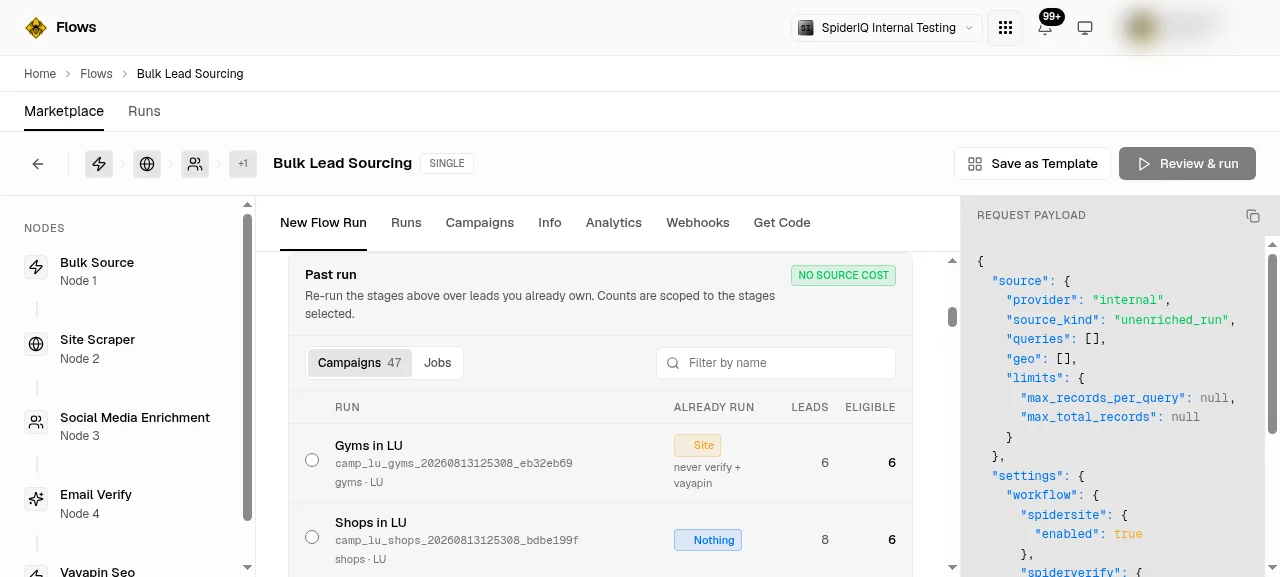
Under Source, open the picker and choose Your existing leads. The badge reads
NO SOURCE COST, because nothing is being bought.Tick the enrichment stages you want, before you pick any leads. The counts you are about to see are measured against these stages, so changing them changes the answer.
Choose A past run to work from one campaign, or Query the corpus to filter across everything.
For a past run, you get a list of your campaigns with a label showing what each one already ran, and two numbers per row.
For a corpus query, start from a preset or add your own conditions. A preset writes its conditions into the builder where you can edit or delete them, rather than hiding them.
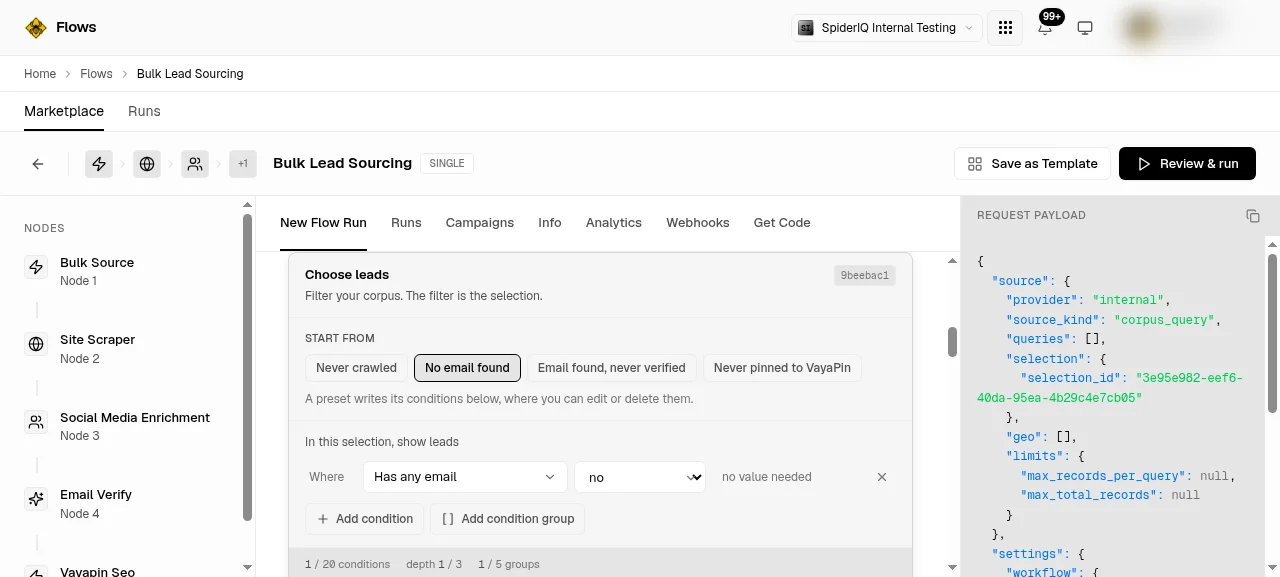
Read both numbers before you continue. They are not the same thing, and the second one is the one that matters. See below.
Click Review & run, check the confirmation screen, and start the run.
The two numbers, and why they differ
Note: This is the single thing worth understanding on this screen.
Match is how many leads your question describes. Eligible is how many of those would actually gain something from the stages you ticked.
A lead whose website was crawled last month gains nothing from another crawl, so it is counted as matched but not eligible. On a corpus you have been building for a while the gap can be large, and that is the system working. Selecting 5,000 leads and enriching 200 of them is an ordinary result, not an error.
Eligible is the number your run is sized and priced on. It is also the number that moves when you change the stages: tick one more stage and leads that had nothing to gain suddenly do.
Verify it worked
Open the Runs tab on the flow. Your run appears with the eligible count you were shown, and the leads move through the stages one job at a time. Open any finished child job and you will see the same result shape a campaign produces, so anything that already reads your campaign output reads this too.
If you queried the corpus, the filter is what was saved, not the list of leads. The filter is re-run when the run starts, so a count taken a day earlier can move if your leads changed in between.
Troubleshoot
Eligible says 0, but match is large. Every lead your question found already has everything the ticked stages produce. Add a stage, or widen the filter.
The eligible number changed when I did not touch the filter. You changed the stages. Eligibility is measured against the stages, so the two always move together.
A campaign I remember as maps-only says it already ran more than that. A campaign saved without an explicit stage configuration ran the full pipeline, not an empty one. The label reflects what really ran.
I want the leads themselves, not a run. This screen enriches. To read the data you already hold, use the lead data API instead.
The run is taking hours. Fan-out is paced against your hourly job allowance rather than dispatched all at once. A large run genuinely takes a long time; it is not stuck.