Who this is for: Anyone who needs leads across many search terms and many towns at once, and would rather make one purchase than set up a campaign per location.
Already holding a list? You do not have to buy it again. See Enrich a list you already have.
What this does: Buys one list covering every search term in every location you name, removes the duplicates, then runs each remaining business through the same website scrape, email verification and VayaPin steps a campaign uses.
Before you begin
Your plan includes bulk lead sourcing. If the source dropdown is empty, it does not.
You know roughly how many records you want. Bulk spends in one go, and a run cannot be stopped once the provider accepts it.
You have decided whether you want VayaPin profiles. Turning VayaPin on publishes one permanent public page per lead.
Steps
Open Flows and choose Bulk Lead Sourcing.
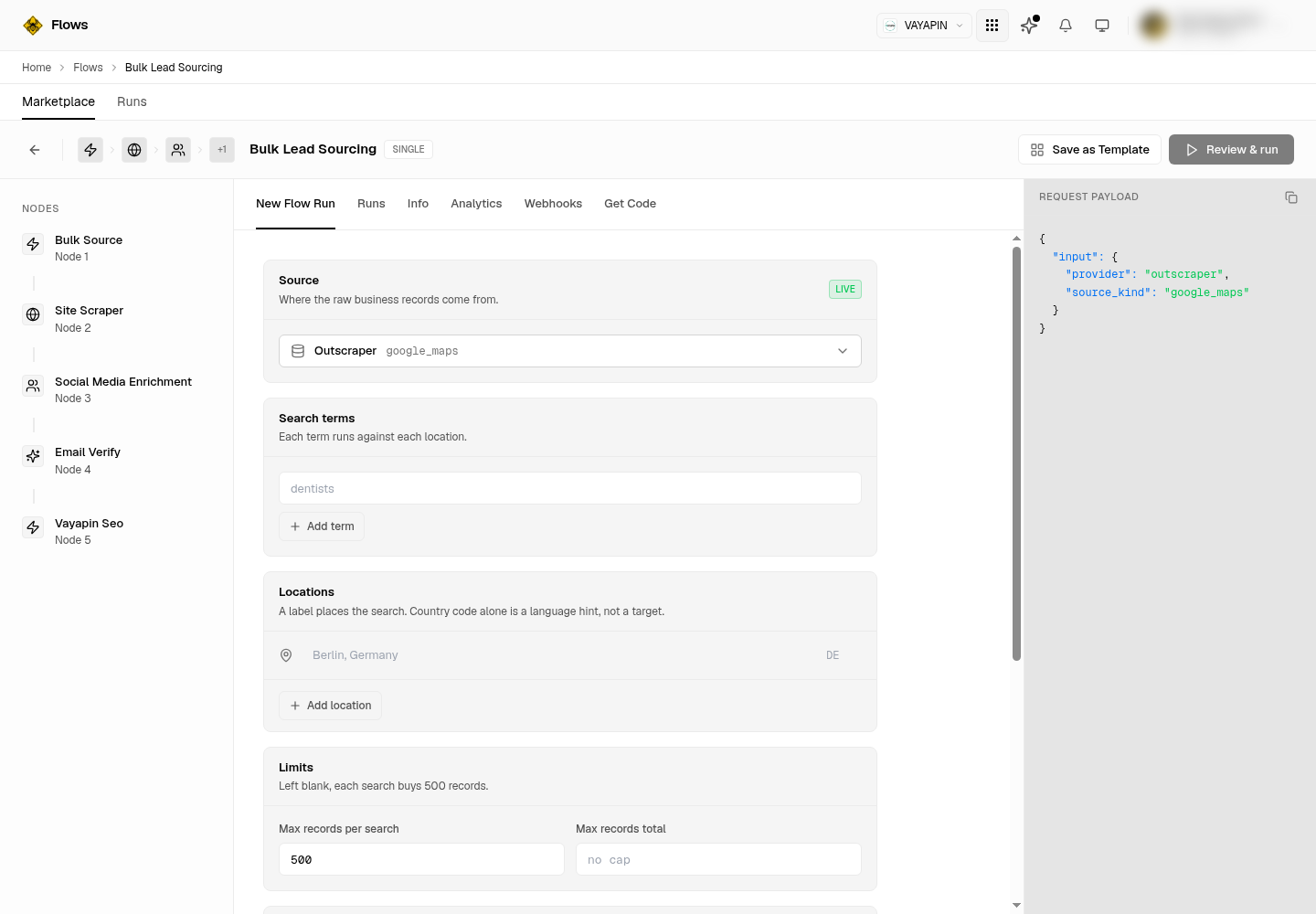
Under Source, pick where the records come from. Two providers sell Google Maps records: Outscraper and Apify. Apify is billed per record and shows you a real figure in the confirmation panel; Outscraper has no unit price configured, so its cost reads not priced. The green LIVE badge means the source is available on your plan. The two upload options in the same list, CSV upload and JSON upload, take a file instead of buying anything and are covered in Enrich a list you already have.
Under Search terms, add each thing you are looking for. Use Add term for more. Every term runs against every location, so three terms and four towns is twelve searches, not seven.
Under Locations, add each place and give each one a label such as
Berlin, Germany. The country code beside it does not place the search, it is only a language hint. A location with a country code and no label buys a nationwide list of real businesses that nobody asked for, and nothing about the result will look wrong.Under Limits, set Max records per search. Leave it blank and each search buys 500 records. Set Max records total if you want a hard stop for the whole run.
Click Review & run. Nothing is bought yet.
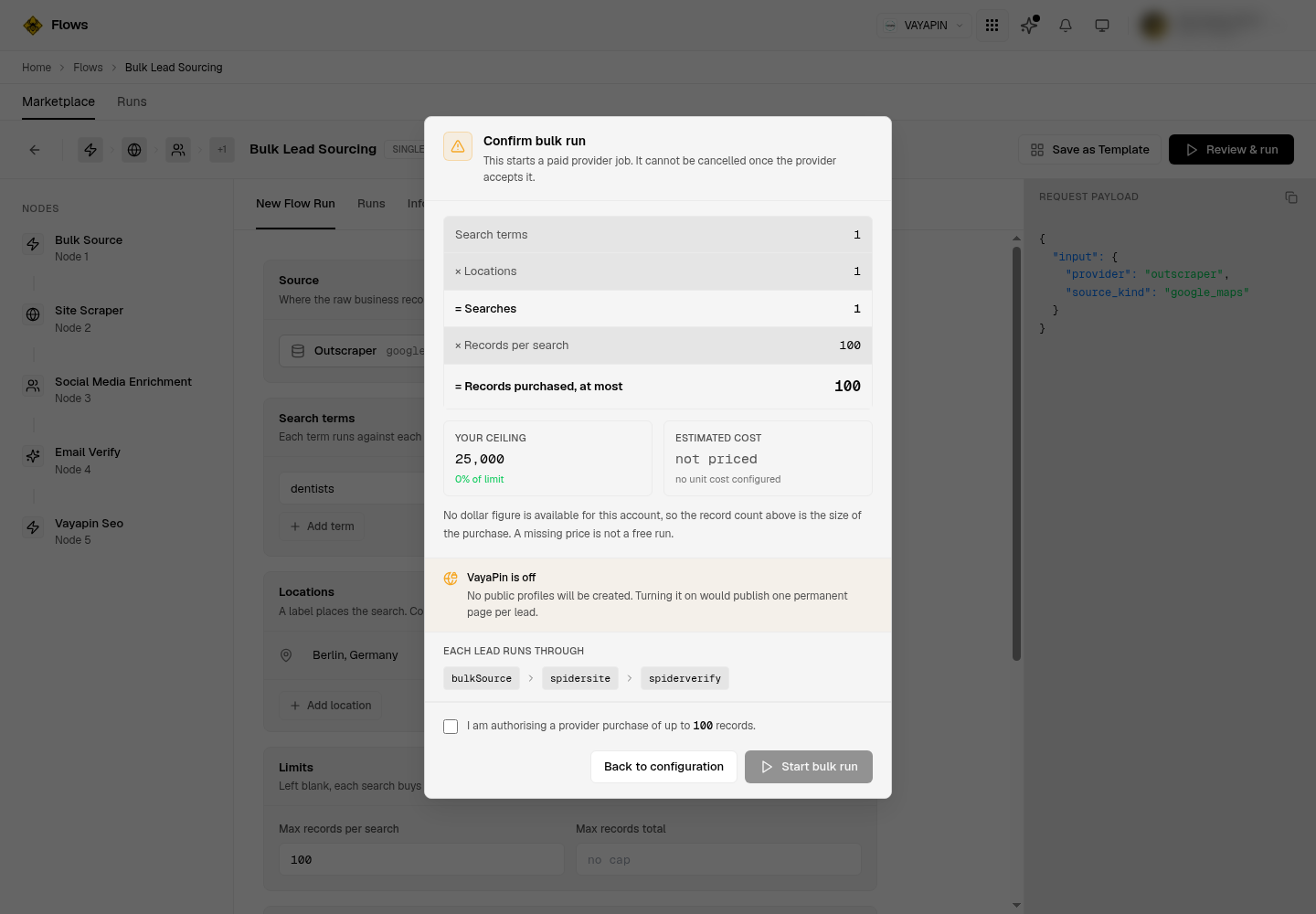
Read the confirmation panel. It multiplies your terms by your locations by your records per search and shows the total as Records purchased, at most. Check that against Your ceiling. If the cost reads not priced, no unit price is configured for your account: that does not mean the run is free, and the record count is the size of the purchase.
Tick I am authorising a provider purchase, then click Start bulk run.
Steps 1 to 5 happen on this form. Note the record limit, which is the field that decides what you spend:
Step 7 is this panel. It is the last point at which nothing has been bought:
Verify it worked
Open the Runs tab. A new run appears and moves through submitted, polling, parsing and fanning out, then sits at enriching while the pipeline works. Polling for a few hours is normal while the provider works through your searches.
enriching is not finished. It means the records were bought and split into one job per lead, and the scraping and verification are still running. A run that enriched only some of its leads reports partial and carries an enriched and a not-enriched count; one that enriched none reports failed rather than completed.
The run has genuinely finished the pipeline, not just the purchase, when leads carry verified email addresses. Contact details are never requested from the provider, so an email on a lead can only have come from the website scrape, and a verified one can only have come from email verification.
An empty run is not automatically a broken one. A run can buy records, reject every one of them against your own filters, and finish correctly with nothing to enrich. The results now say which of the two happened: a kept count of zero sitting beside a reason such as "too few reviews" is your filter working, while a run that never got as far as screening reports no counts at all. Ask your developer to read the results endpoint, which returns those numbers today; the Runs tab does not show them yet.
Troubleshoot
The source dropdown is empty or says "Not available yet". Bulk lead sourcing is not enabled on your plan. Talk to your account contact.
"Start bulk run" stays greyed out. You have not ticked the authorisation checkbox, or you have no search term or no location yet.
The run was refused because it is too large. Your estimate is above your per-job record ceiling, 25,000 by default. Reduce Max records per search, or cut locations or terms, and review again. Resubmitting the same run will fail the same way every time.
The run was refused on spend. Your projected spend for the last 24 hours would cross your cost limit. Wait for the window to roll, or make the run smaller.
You got far more records than you expected. You almost certainly left Max records per search blank, which buys 500 per search. Count records, not searches.
The same business appears in two different runs. Duplicates are removed within a run, never across runs. A business you bought last week will be bought again this week.
The run says completed but there are no leads at all. Records were probably bought and then rejected by your own screening, which is a working run rather than a failed one. The results carry a kept count and a reason for every record dropped. If there are no counts at all, the run stopped before it screened anything and that is the real fault.
The cost reads "not priced" on one provider and a real figure on another. Outscraper has no unit price configured on your account, so only the record count bounds the run. Apify is priced per record, so its figure is a real estimate. "Not priced" never means free.
Related
Enrich a list you already have — the same pipeline, starting from your own CSV or JSON file.
Enrich leads you already have — skip the purchase entirely and re-run the stages over leads already in your account.
Bulk Lead Sourcing API — the same capability over HTTP, the CLI and MCP.