Who this is for: Anyone holding a list of businesses already, in a spreadsheet or an export, who wants websites scraped and email addresses verified without buying the list again.
What this does: Takes a CSV or JSON file you upload, reads your columns, and runs each row through the same website scrape, email verification and VayaPin steps a purchased list goes through. Nothing is bought at the source.
Before you begin
Your file has one business per row and a header row naming the columns. The headers can be anything; you will map them in step 5.
Your file is under 64 MB. Split a larger one.
At least one column identifies the business: a name, a website, a phone number, a
place_id, or agoogle_place_id. Without one of those, every row looks identical, deduplication collapses the file to a single lead, and there is nothing for the enrichment steps to look up.You have decided whether you want VayaPin profiles. Turning VayaPin on publishes one permanent public page per lead.
Steps
Open Flows and choose Bulk Lead Sourcing.
Under Source, pick CSV upload or JSON upload. The Search terms, Locations and Limits fields disappear, because an upload has nothing to search for.
Click the file picker and choose your file. It uploads immediately. Uploading is not running: nothing is queued and nothing is spent yet, and an unused file is discarded after 7 days.
Check the record count that comes back. It is counted by reading the stored file back, so it is the real number of rows we hold, not the number your spreadsheet showed.
Work through the column mapping panel. We propose a mapping for the columns we recognise and leave the rest blank. Confirm each proposal or change it, and set anything we missed. Leave a field on — not in my file — if you do not have it.
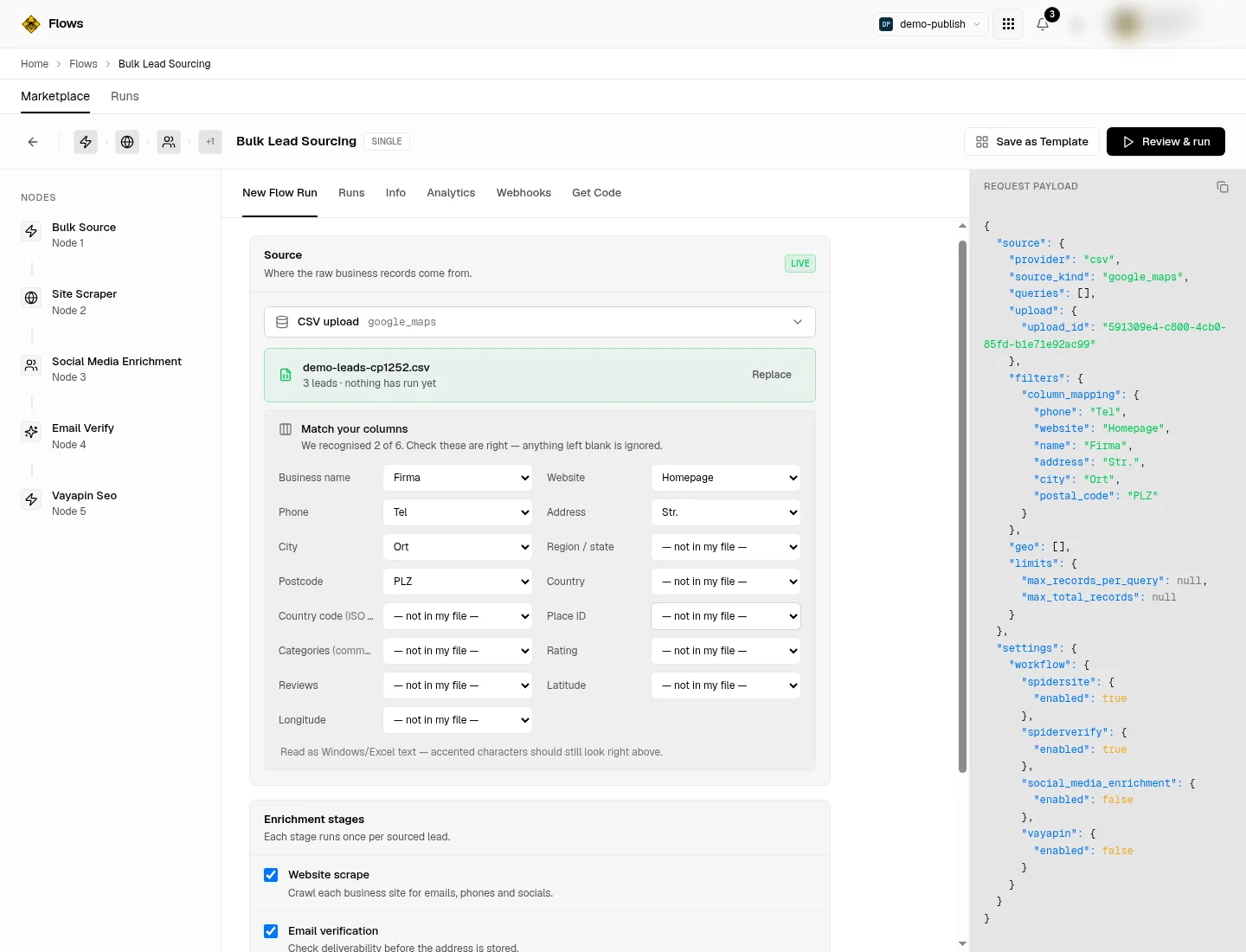
Under Enrichment stages, switch on the steps you want. This is the part you pay for, once per lead per stage.
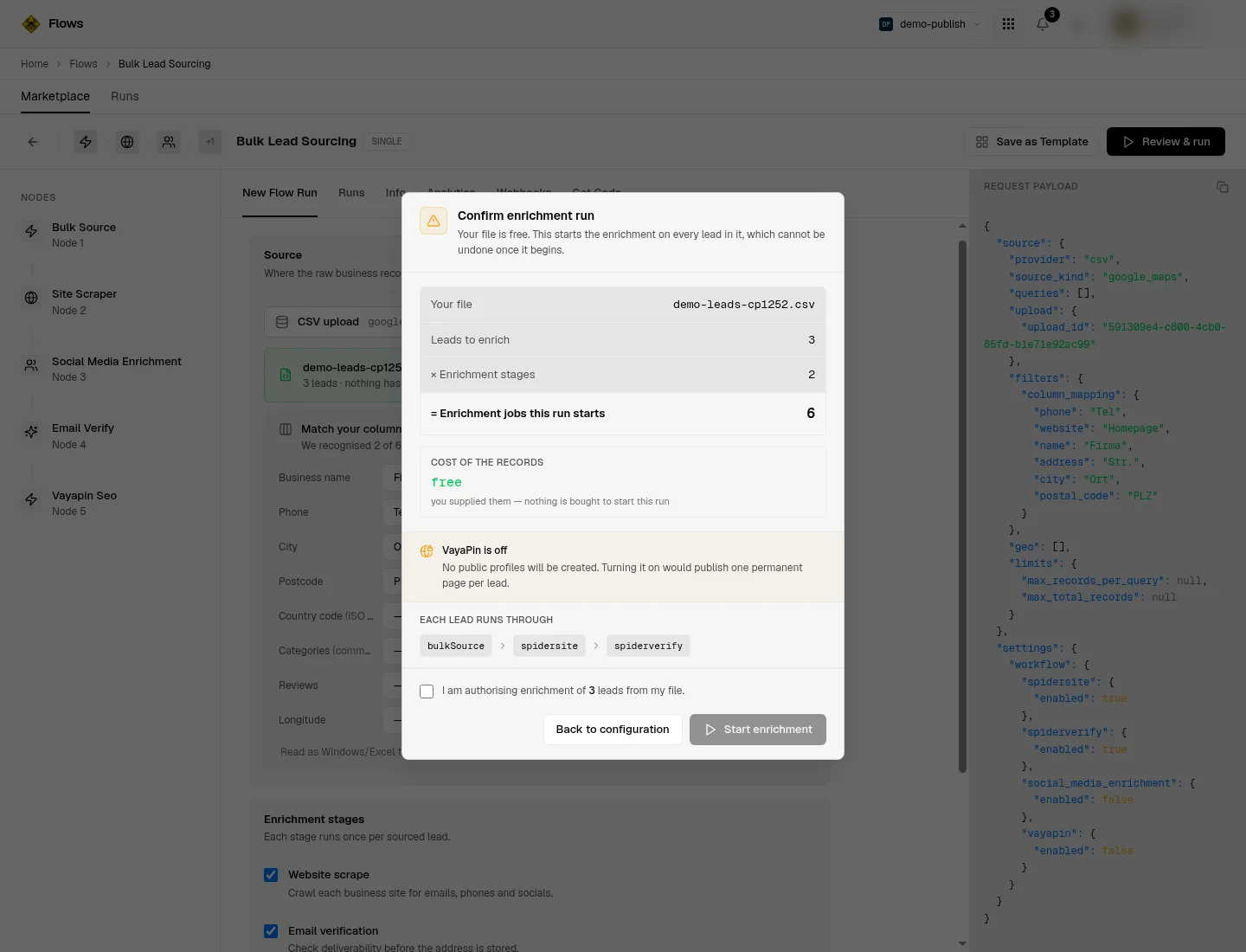
Click Review & run, then read the confirmation panel. It shows the cost of the records as free and the enrichment volume as leads times stages. Tick the acknowledgement and click through to start.
Verify it worked
Open the Runs tab. The run moves through parsing and fanning out, then sits at enriching while the pipeline works. enriching is not finished: sourcing succeeded, enrichment has not.
The run has genuinely finished when it reports completed and the results carry verified email addresses. We never accept contact details from your file, and there is no column you can map onto an email field, so an email on a lead can only have come from the website scrape and a verified one only from email verification. That makes an email the one piece of evidence your own upload could not have produced.
If some leads enriched and others did not, the run reports partial and the results carry an enriched and a not-enriched count. If none enriched, it reports failed rather than completed.
Troubleshoot
CSV upload and JSON upload are greyed out. Bulk lead sourcing is not enabled on your plan. Talk to your account contact.
"That CSV has no usable header row." The first line is blank or only separators, such as
;;;;;. Delete it. We refuse rather than guess, because adopting your first business as the header would lose that lead and mislabel every column."That file has a header row but no data rows." The file is headers only. Nothing was stored and nothing was charged.
The file is rejected as too large. The limit is 64 MB. A much larger file is refused earlier by the edge and comes back as a plain web page rather than a readable error; either way, split the file.
"Review & run" stays greyed out. You have not mapped an identifying column. Map a name, website, phone,
place_idorgoogle_place_idand it re-enables.Accented characters look wrong in the preview. We detect the file's encoding and say which one we used under the mapping panel. If it reads as the wrong one, re-save the file as UTF-8 and upload again.
Everything collapsed into one lead. You mapped no identifying column, so every row deduplicated onto the same key. Map one and re-upload.
You have to upload again after a failure. A file is claimed by the run that consumes it. If that run fails before anything is spent the claim is released and the same file can be submitted again, but a file consumed by a run that got as far as spending is used up.
Related
Buy a lead list in bulk — the same pipeline, with the records purchased instead of uploaded.
Bulk Lead Sourcing API — the upload and submit endpoints over HTTP.