SpiderIQ Journal
Stop paying Cloudinary, Vimeo, and Mux — it's all in SpiderIQ now (and it's AI-native)
Image hosting, on-the-fly transforms, video hosting and streaming, and day-one analytics — the stack you were renting from three vendors is now built into SpiderIQ, on one catalog, and wired for your AI agents.

If you run a modern web presence, your media has probably been living across three separate bills: Cloudinary to host and transform images, Vimeo to host and stream video, and Mux to get analytics on how those videos perform. Three vendors, three logins, three invoices — for what is really one job.
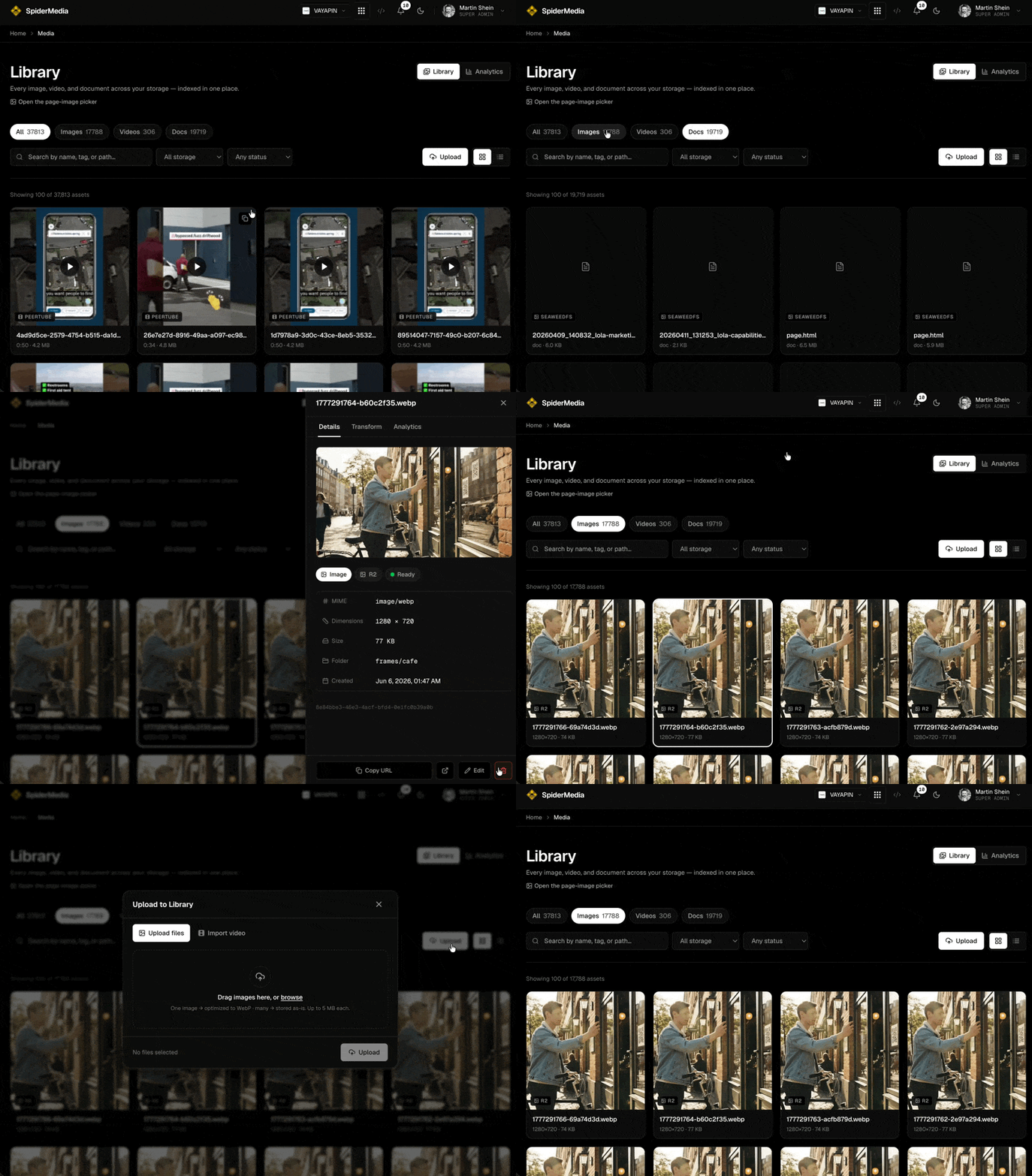
Meet SpiderMedia. It turns everything we already host for you — every image and video across all of your sites — into one managed Library you can browse, search, upload to, organize, and measure. It is already included in your SpiderIQ account, and it was built AI-native from the ground up.
Everything Cloudinary does — image hosting + on-the-fly transforms
Host every image, then get any version of it on demand. Need a 16:9 thumbnail for a card, a web-optimized hero, a square avatar, or a modern format like WebP or AVIF? Ask for it by URL. SpiderMedia derives that exact variant from your original, caches it on our CDN, and serves it — no re-uploading, no separate image CDN to wire up, and no per-transform invoice at the end of the month.
Everything Vimeo does — video hosting + adaptive streaming
Upload a file straight from the Library, or import a video by URL from YouTube, Vimeo, or a direct link. We host it, transcode it into an adaptive quality ladder up to 1080p, and stream it from our own player — your videos, on your domain, with no third-party logo and no upload caps to babysit.
Everything Mux does — analytics, populated from day one
Because we run the player ourselves, every video shows views and viewers from day one — no SDK to install, no separate analytics product to bolt on. Track a 7-, 30-, or 90-day trend, see how a video compares to the platform average, and dig into watch-time and retention. The numbers are simply there, the moment a video goes live.
One Library for your team
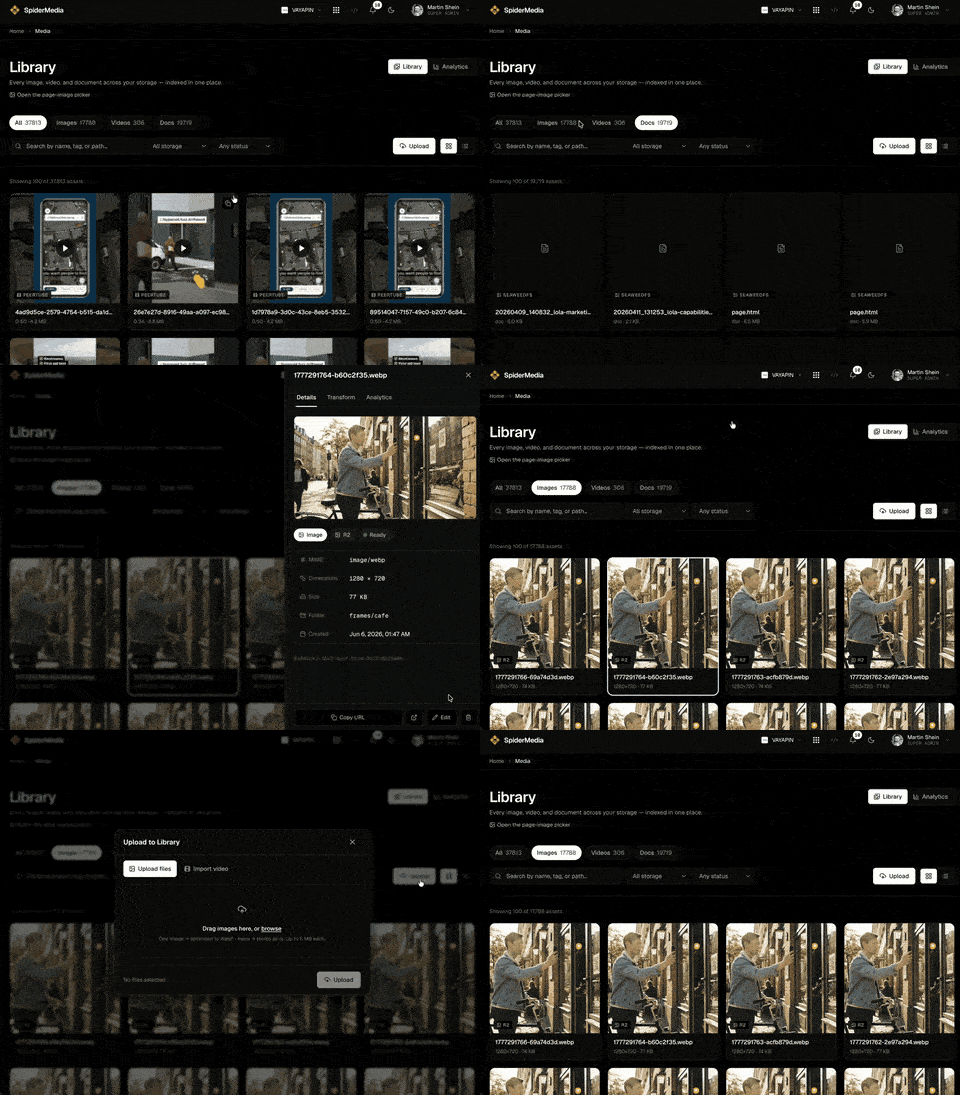
Open the new Media tab in your dashboard to see every asset across every storage tier in one place. Filter by type or status, search by name or tag, drag-and-drop or batch-upload new files, import a video by URL, edit folders, tags, and alt-text, copy a public URL in one click, and delete cleanly — with no orphaned files left behind.
And it's AI-native — the same media, for every agent
This is the part no other media host gives you. The entire Library is a first-class surface for automation, over three channels that all read and write the same catalog — no fork, no glue code:
AI automations call the REST API (Bearer auth) to upload, search, transform, and pull analytics programmatically.
Claude Code and any terminal workflow drive it through the
spideriq mediaCLI.Your OPVS, Hermes, and OpenClaw agents use the MCP tools and skills — derive an image, search the catalog, import a video, read a video's stats — natively, with no integration work.
What a person sees in the Media tab is exactly what an agent sees over MCP. One source of truth for your whole team, human and machine.
Why AI-native matters
Media is no longer something only people touch. Your agents build pages, generate the right-sized image for each layout, import and caption video, and report on what is working — all against the same catalog, with the same permissions, in real time. A traditional DAM bolted onto three vendors can't do that. SpiderMedia was designed for it.
It's already in your account
There is no new vendor to sign up for and nothing to migrate. Open the Media tab to browse your library, upload your first asset, or check how a video is performing. And point your agents at the API, CLI, and MCP — they can start building with your media today. This is AI-native media hosting: hosting, streaming, transforms, and analytics, on one catalog, wired for your agents from day one.

Martin Shein
Build With SpiderIQ
Explore the API docs or keep reading the field notes from the SpiderIQ team.